



‘AI’ is everywhere. So what now?
Use it to your advantage.
‘AI’ is everywhere. So what now?
- Open LinkedIn: IA
- Open the news feed: IA
- Your manager sends a link about IA
- The company announces an"AI strategy"
- Your colleague is already using three different tools, and you haven't quite figured out any of them yet.
If you feel this way, you’re not alone. The speed at which new tools, frameworks, and buzzwords emerge is genuinely overwhelming. "Agentic coding," "vibe coding," "prompt engineering," "MCP servers"... for someone just trying to do their job and deliver working code, all this noise can be paralyzing. The result? Many people simply don't start..
Or they start in the worst way possible: Pasting code into ChatGPT and praying that the response actually works.
This article is for you if you’re at that point. No unnecessary buzzwords, no abstract theory. We’re going to look at a concrete tool, Claude Code, and how it can change the way you work day-to-day. And more importantly: we’re going to see how to get started, step by step..
The Problem you Probably know
You copy a traceback, paste it into a chat window, and receive a fix that breaks something else in a file the AI didn't even know existed. You explain the project structure, the context gets lost halfway through, you open a new conversation, and you're back to square one.
Sound familiar? It’s not you. It’s the interaction model. Chat-based tools don't see your project, they can't run your tests, and they forget everything once the context window fills up. The result? The integration work falls entirely on you: copying code between windows, re-explaining the project, and reviewing output you don't fully trust.
There is a different way to work.
What is Claude Code ?
Claude Code is an agentic coding tool created by Anthropic that lives directly in your terminal (and beyond). Unlike traditional chat assistants, it reads your files, edits them directly, runs tests, sees the errors, fixes them, and manages git—all within your actual project.
The fundamental difference: instead of you being the messenger between the AI and your codebase, the agent works inside the codebase. It understands your file structure, dependencies, and the full context of the project.
Claude Code is available in the terminal (CLI), VS Code, Cursor, Google Antigravity, JetBrains IDEs (IntelliJ, PyCharm, WebStorm), as a desktop app, and even in a web version at claude.ai/code. It supports the Claude Opus 4.6 and Sonnet 4.6 models, with up to 1M tokens of context.
Installation: Choose the Method That Suits You
One of the most common barriers to entry is installation. Here are all the available methods. Choose the one that suits your setup.
macOS / Linux / WSL:
curl -fsSL https://claude.ai/install.sh | bashWindows PowerShell:
irm https://claude.ai/install.ps1 | iexWindows CMD:
curl -fsSL https://claude.ai/install.cmd -o
install.cmd && install.cmd && del install.cmd
Note for Windows:
You need to have Git for Windows installed first. If you see an error regarding &&, you’re probably in PowerShell rather than CMD. Use the PowerShell command above.
Via Homebrew (macOS/Linux)
brew install --cask claude-codeVia WinGet (Windows)
winget install Anthropic.ClaudeCodeVia npm (for those who already have Node.js)
npm install -g @anthropic-ai/claude-codeWithout Installing Anything: Web Version
If you don't want to install anything locally, you can use Claude Code directly in your browser at claude.ai/code. It works with GitHub repositories without requiring you to have them cloned locally.
Extensões de IDE Se preferes trabalhar dentro do teu editor:
VS Code / Cursor : search for "Claude Code" in the extensions marketplace.
Google Antigravity :as a VS Code fork, Antigravity is 100% compatible with VS Code extensions. Just install the "Claude Code" extension the same way. If you already use Antigravity as your primary IDE (with Gemini 3 Pro included for free), you can combine the best of both worlds: Antigravity's agents for certain tasks and Claude Code for your SDLC workflow.
JetBrains (IntelliJ, PyCharm, WebStorm) : install the "Claude Code" plugin from the JetBrains Marketplace.
Desktop App Available for direct download:
- macOS (Intel e Apple Silicon) : Download
- Windows x64 : Download After installing via any of the methods, navigate to your project and run:
cd uour-project
claude
On your first use, you will be guided through the authentication process
The First Request
Once you are inside Claude Code, you can simply type in natural language:
Analyze this project and tell me the general structure, the main dependencies, and if there are any tests configured.
CLAUDE.md: The File That Changes Everything
The most powerful concept in Claude Code is the CLAUDE.md file. Placed at the root of your project, it functions as a persistent "briefing" that the agent automatically reads in every session.
Here, you define:
- Project architecture: tech stack, folder structure
- Useful commands: how to run the dev server, tests, the linter
- Team conventions : "usa sempre interfaces em vez de types", "escreve testes antes do código", "cada PR precisa de docstring atualizada"
- Accumulated learnings: lessons learned that the agent should keep in mind
Project: Customer Management API
## Architecture
- Node.js 22 + TypeScript 5.7
- Fastify + Prisma + PostgreSQL
- Vitest for testing

## Comands
- `npm run dev` : development server
- `npm run test` : test suite
- `npm run lint` : ESLint + Prettier

## Convenções
- Interface over Type for object shapes
- Error handling with Result pattern (never throw in business logic)
- All endpoints return { data, error, meta }
- Tests mandatory before merge

## Learnings
- 2026-03-15: Always invalidate session cache when changing permissions
-  2026-03-20: Use connection pooling for environments with 50+ connections
Plan Mode: Think Before Acting
/plan Rewrite the authentication module to use JWT with refresh tokensOne of the most common mistakes when working with AI is asking it to implement immediately. Claude Code has a Plan Mode that separates thinking from execution:
The agent analyzes the codebase, identifies the affected files, proposes an approach with clear steps, and waits for your approval before touching a single line of code. You review, adjust, and only then give the green light.
This is transformative: instead of receiving code you don't understand, you participate in the architectural decision and then let the agent execute the approved plan.
Custom Slash Commands: Your Automated Workflow
Claude Code allows you to create slash commands, which are custom commands that define reusable workflows. You save .md files in .claude/commands/ and use them with /command-name.
For example, a /feature command that defines your complete development process:
<!-- .claude/commands/feature.md -->
## Feature Development Workflow

1. Read the project's CLAUDE.md and STATUS.md
2. Analyze the existing codebase to understand patterns
3. Plan the implementation (show the plan and wait for approval)
4. Implement the code following the project conventions
5. Write unit and integration tests
6. Run the tests and fix any failures
7. Update the documentation
8. Create a commit with a descriptive message
9. Open a Pull Request
From Slash Commands to a Complete SDLC Workflow
Individual slash commands are useful, but the real leap happens when you organize them into a complete workflow that covers the entire software development lifecycle, from discovery to retrospective.
I wrote about this topic in detail in two previous articles:
Stop Using AI Just for Code Completion: Here's a Workflow That Covers Your Entire SDLC : explica o porquê e o como de cada uma das 10 fases do workflow, incluindo code intelligence, semantic retrieval, visualização com HTML, integração com n8n, e web scraping com Firecrawl.
Prompt Examples: AI-SDLC Workflow in Practice: practical examples of prompts with GOAL and GUARDRAILS for real?world scenarios: prototyping a new feature, fixing a bug, doing an emergency hotfix, adding tests to legacy code, refactoring a monolith, and much more.
The open-source repository with the complete workflow is right here: claude-code-ai-development-workflow
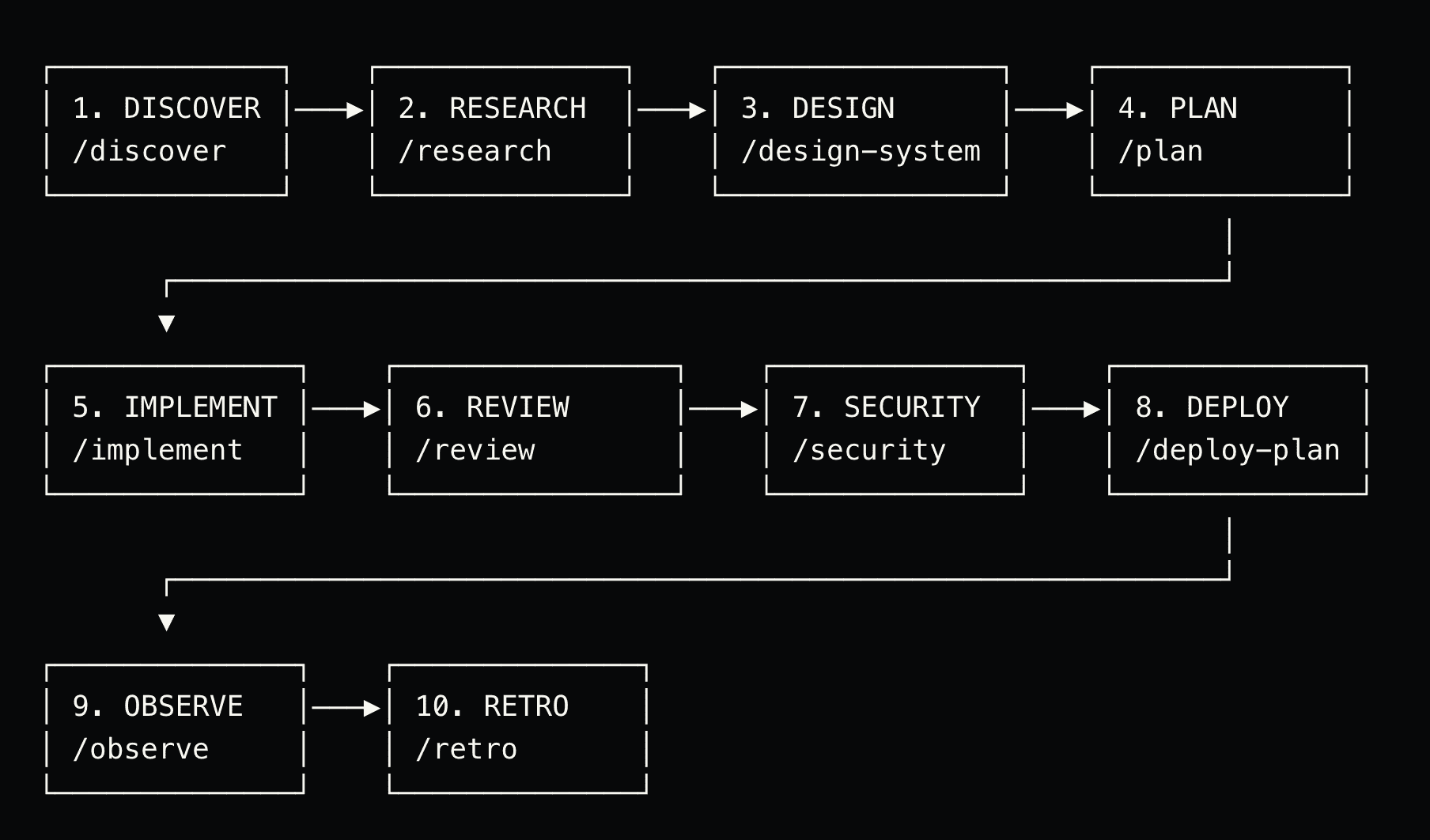
The 10 Phases in Summary
/discover :Define the scope, detect the tech stack, and create the issue and progress dashboard.
/research :Deep analysis of the existing codebase, patterns, dependencies, and risks.
/design-system : Architecture, ADRs (Architecture Decision Records), and system specification.
/plan : Detailed implementation plan with phases, tasks, and testing strategy.
/implement : Code + tests, phase by phase, following the approved plan.
/review : Code review with a quality checklist.
/security : Security audit with OWASP, STRIDE, and dependency scanning.
/deploy-plan : Deployment strategy with rollout and rollback plans.
/observe : Observability with logging, metrics, alerts, and dashboards.
/retro : Retrospective that automatically updates CLAUDE.md with lessons learned.
Start to use
#  Copy the .claude/ folder to your project root
cp -r .claude/ /path/to/your/project/.claude/

# Start by discovering a new feature
/discover Add JWT authentication with refresh tokens and RBAC
Not Everything Needs 10 Phases
| Type of Change | Recommended Phases |
|---|---|
| Spelling mistakes | Direct fix |
| Simple bug | Research → Implement → Review |
| Medium feature | Discover → Research → Plan → Implement → Review |
| Large feature | All 10 phases |
| Emergency | /hotfix (Research → Fix → Review → Compress Deploy) |
Intelligent Model Routing
Stack Auto-Detection
Context Management: The Detail That Makes the Difference
Context is the most valuable resource when working with AI agents. Some best practices:
- Up to 50% context used: work freely
- 50-70%: start paying attention to what you request
- 70-90% : use /compact to compress the context
- 90%+ : use /clear and restart (mandatory)
Claude Code has native commands for this. /compact compresses the conversation while keeping the essential points, /clear wipes everything, and /context shows how much of the window is already occupied.
Best Practices for Teams
If you are in a consulting team or a product squad, these practices make all the difference:
Share the CLAUDE.md in the repository. The entire team benefits from the same conventions, and the agent behaves consistently for everyone.
Use Plan Mode for architectural decisions. Before implementing complex features, review the plan as a team. The agent documents the approach, and the team validates it before execution.
Create slash commands for team workflows. If your process is "branch - implement - test - PR - code review," encode that into a command. It reduces friction and ensures consistency.
Record learnings in CLAUDE.md. Every sprint and every retrospective, add a line to the file. The agent becomes progressively better at understanding your specific project.
Always review generated code. Claude Code is a powerful tool, but the responsibility for quality remains yours. Use the agent to accelerate, not to replace human judgment.
This Isn't Just for One Language
What Changes in Practice?
The transition from "AI chat" to "terminal agent" fundamentally changes the way you work:
You stop being the messenger. The agent reads and writes to your project directly.
Context persists. The CLAUDE.md file ensures the agent knows how your project works, session after session.
The workflow is reproducible. Slash commands transform processes into automated routines.
Review is about quality, not integration. Instead of spending time pasting code and checking if it fits, you focus on validating the logic and the architecture.
The system improves over time. With every /retro, lessons learned feed into the next features. The agent becomes progressively more calibrated to your project.
Recursos
- Claude Code official documentation
- My Repository: Complete AI-SDLC Workflow: slash commands for the 10 phases of the development cycle
- AI-SDLC Web : web-based overview of the workflow
- Article: Stop Using AI Just for Code Completion : the why and how of each phase
- Article: Prompt Examples, AI-SDLC in Practice: epractical prompt examples for real-world scenarios
- Claude Code plans and pricing: Claude Pro starting at $20/month